
Cyrus Kiani
Founder / CEO



Master Your Mobile Development Workflow for iOS and Android
Startups launching mobile apps often face unpredictable timelines, performance issues, and scaling roadblocks that stem from inconsistent development workflows. Without a structured approach, your team risks costly delays, fragmented code, and user-facing bugs that damage your app's reputation. This guide walks you through proven mobile development workflow strategies that enhance app design, accelerate development, and scale effectively across iOS and Android platforms, helping you deliver high-quality apps that meet user expectations and business goals.

Key Takeaways
Point | Details |
|---|---|
Structured workflows | A structured workflow reduces development time and minimizes costly errors by aligning design, development, and QA processes from planning to release. |
Native versus cross platform | Choosing between native and cross platform impacts scalability and cost, influencing how quickly you can reach both iOS and Android. |
Test edge cases early | Early testing of edge cases such as network instability and device fragmentation prevents user facing issues at launch. |
Continuous verification | Continuous verification ensures app performance and reliability across updates by integrating monitoring and automated tests. |
Integrated design to scale | Expert workflows integrate design development and scalability factors to support consistent delivery from concept to release. |
Preparing your mobile development workflow
Before writing a single line of code, you need to establish a solid foundation that aligns your technical approach with your startup's goals. Identify your app's target users, the platforms you'll support (iOS, Android, or both), and the performance requirements that will satisfy your audience. Understanding these factors upfront prevents mid-project pivots that waste resources and delay launch.
Assess whether native, cross-platform app development, or hybrid fits your startup's goals by balancing speed against performance needs. Native development delivers peak performance and full hardware access but requires separate codebases for iOS and Android. Cross-platform frameworks like Flutter and React Native enable cross-platform approaches offering up to 70% time reduction for startups, making them attractive when you need to reach both platforms quickly. Hybrid solutions sit between these extremes, wrapping web technologies in native containers for moderate performance at lower cost.
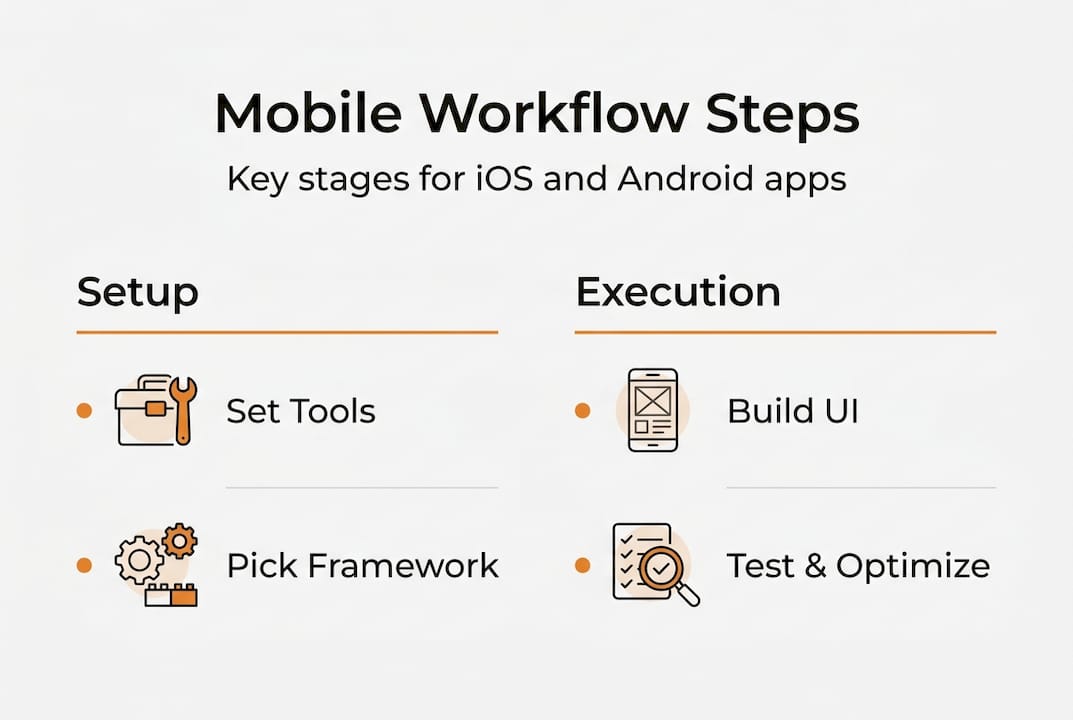
Prepare tools, team roles, and project management systems aligned with your workflow needs. Set up version control with Git, establish continuous integration pipelines, and define clear responsibilities for designers, developers, and QA testers. Your project management system should track feature progress, bug reports, and release milestones in one centralized location accessible to all stakeholders.
Consider this comparison when choosing app development frameworks:
Approach | Development time | Cost | Scalability | Best for |
|---|---|---|---|---|
Native | Longer (separate codebases) | Higher | Excellent | Apps needing peak performance or advanced hardware features |
Cross-platform | Faster (shared codebase) | Moderate | Good | Startups prioritizing speed to market and budget efficiency |
Hybrid | Moderate | Lower | Fair | Simple apps with limited native feature requirements |
Key preparation steps include:
Define user personas and core app features before technical planning
Evaluate your team's existing skills to match framework selection
Set up development, staging, and production environments early
Establish coding standards and documentation practices
Choose analytics and monitoring tools that integrate with your stack
Pro Tip: Early clear framework choice reduces future refactoring and cost overruns by preventing technical debt accumulation.
With your workflow prerequisites set, the next section guides you through the development execution steps.
Executing your mobile development workflow
Follow a structured design to development pipeline that moves from UI/UX design through API integration and platform-specific adaptations. Start with wireframes and user flows that map your app's core interactions, then create high-fidelity mockups that define visual style and component behavior. Once designs are validated with stakeholders, begin development by setting up your project architecture, implementing core features, and integrating backend services.

Use iterative testing cycles targeting critical edge cases like network instability and device fragmentation. Edge cases like device fragmentation and network issues require systematic boundary testing and logs analysis to catch problems that only surface under specific conditions. Test on real devices across different manufacturers, screen sizes, and OS versions to verify your app behaves consistently. Simulate poor network conditions, low battery states, and memory constraints to ensure graceful degradation.
Essential development steps:
Set up your development environment with required SDKs and dependencies
Implement core navigation and screen flows based on approved designs
Integrate authentication, data storage, and API connections
Add platform-specific features using native modules when needed
Conduct code reviews to maintain quality and share knowledge across your team
Run automated tests on each commit to catch regressions early
Perform manual testing on target devices to validate user experience
Document APIs, component usage, and deployment procedures
Common development pitfalls to avoid:
Ignoring OEM battery optimizations that can kill background processes
Hardcoding values instead of using configuration files for flexibility
Skipping accessibility features that exclude users with disabilities
Neglecting app size optimization that frustrates users on limited data plans
Failing to handle permission denials gracefully on iOS and Android
Overlooking localization requirements until late in development
Pro Tip: Automate tests with AI-generated scenarios to catch elusive bugs early by exploring user paths your team might not manually test.
Implement mobile app optimization strategies throughout development rather than treating optimization as a final step. Profile your app's performance regularly to identify bottlenecks in rendering, network calls, or data processing. Optimize images and assets for different screen densities, lazy load content when appropriate, and cache data intelligently to reduce server load and improve responsiveness.
After executing development, verifying and scaling your app ensures long-term success, discussed next.
Verifying and scaling your mobile app effectively
Apply continuous integration and monitoring tools to verify app stability and performance across device types. Set up automated build pipelines that run your test suite on every code commit, catching integration issues before they reach production. Implement crash reporting tools like Firebase Crashlytics or Sentry to receive real-time alerts when users encounter errors, complete with stack traces and device context that accelerate debugging.
Monitor key performance metrics including app launch time, screen render rates, API response times, and memory usage across your user base. Establish baseline performance targets and track trends over time to identify degradation before users complain. Use A/B testing frameworks to validate new features with subsets of users, measuring impact on engagement and retention before full rollout.
Consider these trade-offs when planning for scale:
Factor | Native advantages | Cross-platform considerations |
|---|---|---|
Performance | Direct hardware access, optimized rendering | Good for most apps, may lag in graphics-intensive scenarios |
Maintenance | Separate updates for iOS and Android increase effort | Single codebase simplifies bug fixes and feature additions |
Scalability | Full control over optimization strategies | Native vs cross-platform trade-offs in performance and hardware access affect scalability choices |
Team expertise | Requires specialized iOS and Android developers | Broader talent pool with JavaScript or Dart skills |
Scalability best practices:
Design modular architecture that separates business logic from UI components
Implement cloud-based backend services that auto-scale with demand
Use CDNs to distribute static assets globally for faster load times
Cache frequently accessed data locally to reduce server requests
Optimize database queries and implement pagination for large data sets
Plan for horizontal scaling by avoiding server-side session state
Monitor third-party API rate limits and implement fallback strategies
Address platform-specific challenges with adaptive workflows to sustain growth. iOS and Android have different app review processes, update cycles, and technical requirements that demand tailored approaches. iOS apps must pass Apple's strict review guidelines and can push updates only through the App Store, while Android offers more flexibility through Google Play and alternative distribution channels. Plan your release schedule around these platform differences, maintaining separate testing tracks for each ecosystem.
Emphasize verification as ongoing, not a one-time stage. Your app's quality depends on continuous attention to user feedback, crash reports, and performance metrics. Establish a regular cadence for reviewing analytics, prioritizing bug fixes, and planning incremental improvements. Successful startups treat verification as a core discipline that runs parallel to feature development, ensuring stability never takes a back seat to innovation.
Apply mobile app scalability tips proactively rather than reactively. Design your architecture to handle 10x your current user base, even if growth seems distant. This forward-thinking approach prevents costly rewrites when your app gains traction, allowing you to focus resources on features rather than infrastructure firefighting.
Having mastered building and scaling your app, learn how expert partners can help accelerate your success.
Find expert mobile app development partners
Partnering with experienced agencies accelerates development and avoids common pitfalls that derail startup projects. Expert teams bring battle-tested workflows, specialized knowledge of platform nuances, and the capacity to scale resources as your needs evolve. Rather than learning expensive lessons through trial and error, you gain immediate access to proven strategies that deliver results.

Touchzen Media provides end-to-end app development, UI/UX design, and scalability planning tailored to startup needs. As a top app developer in California, we combine technical excellence with strategic thinking to transform your vision into high-quality mobile experiences. Our team includes top UX designers in the USA who craft intuitive interfaces that users love, supported by developers who build robust, scalable systems. Recognized among top UI UX design agencies, we deliver comprehensive solutions that align design, development, and business objectives into cohesive workflows.
Leverage expert resources to custom-tailor your mobile development workflow for your startup's success, ensuring you launch faster, scale smarter, and compete effectively in your market.
To wrap up, here are frequently asked questions about mobile development workflows to clarify common concerns.
Frequently asked questions
What is the best workflow for cross-platform mobile development?
The best workflow depends on your team's skillset and app requirements, but successful approaches share common elements. Implement iterative testing cycles integrated with continuous integration and continuous deployment pipelines to catch issues early and deploy updates confidently. Select appropriate tools like Flutter or React Native based on your performance needs and team expertise, then establish consistent coding standards and component libraries that maintain quality across platforms. Balance speed with performance needs by profiling regularly and optimizing critical paths while accepting reasonable trade-offs in less critical areas.
How can startups handle device fragmentation during development?
Use automated boundary analysis, production log monitoring, and AI-driven edge case testing to cover device variations systematically. Integrate real device testing through cloud device farms like AWS Device Farm or BrowserStack to validate behavior across manufacturers, screen sizes, and OS versions without maintaining a physical device lab. Focus testing efforts on devices with significant market share in your target audience, then use crash reporting tools to identify and address issues on edge devices as they surface in production. Implement responsive layouts and adaptive UI patterns that gracefully handle screen size variations rather than targeting specific devices.
What are key considerations for scaling a mobile app post-launch?
Implement modular architecture that separates concerns and allows independent scaling of components as demand grows. Monitor app health continuously using analytics, crash reporting, and performance tracking tools to identify bottlenecks before they impact user experience. Optimize backend services to handle increased load through caching strategies, database indexing, and horizontal scaling of server resources. Keep adapting workflows to evolving platform updates and user feedback by maintaining a backlog of improvements prioritized by impact and effort, ensuring your app remains competitive as the mobile ecosystem changes.
Should startups choose native or cross-platform development for their first app?
Cross-platform development suits startups valuing faster delivery and cost efficiency, allowing you to reach both iOS and Android users with a shared codebase. Native development is better for apps needing advanced hardware features like AR capabilities, complex camera integrations, or peak performance in graphics-intensive scenarios. Evaluate your app's core value proposition and technical requirements honestly, choosing the approach that aligns with your go-to-market strategy and available resources. Most startups benefit from cross-platform frameworks unless specific technical constraints demand native development.