
Cyrus Kiani
Founder / CEO



What Is Web App Architecture? A Founder’s Guide for Startups
Most startup founders think web app architecture is purely a technical concern for developers to solve. In reality, architecture decisions directly impact your product's scalability, user experience, and development costs. Understanding web app architecture empowers you to make informed choices about frameworks, hosting, and team structure before expensive mistakes happen. This guide breaks down core components, common patterns, performance factors, and practical strategies to help you build apps that scale with your business.

Key Takeaways
Point | Details |
|---|---|
Core components | Web apps divide into frontend, backend, and persistence layers, each with distinct roles that influence data flow, scalability, and maintainability. |
Architectural patterns | Monolithic, microservices, MVC, serverless, SPA or SSR each offer tradeoffs in development speed and operational complexity guided by team size and growth goals. |
Performance factors | Performance hinges on framework choice, rendering method, and network conditions that affect load times and responsiveness. |
Startup path | A modular monolith with an evolutionary path to microservices often suits startups by balancing speed with future scalability. |
User experience metrics | Measuring user experience metrics guides architecture decisions and helps prevent costly missteps early in product development. |
Core components of web app architecture
Web app architecture defines interaction between client-side (frontend), server-side (backend), and database components ensuring data flow, scalability, and maintainability. Think of it as the blueprint that determines how your application handles user requests, processes business logic, and stores information. Each tier plays a distinct role in creating seamless experiences.

The presentation layer runs in users' browsers or mobile devices. It handles everything visible and interactive, from button clicks to form submissions. Modern frameworks like React or Vue manage state changes and update the interface without full page reloads. Your UI design best practices directly influence how this layer performs.
The business logic layer processes requests from the presentation tier. It validates inputs, applies business rules, communicates with external services, and orchestrates data operations. This server-side code determines whether a transaction succeeds, calculates pricing, or triggers notifications. Understanding mobile backend overview concepts helps you grasp how APIs connect these layers.
The persistence layer stores and retrieves data through databases. Whether you choose SQL or NoSQL databases affects query performance, data consistency, and horizontal scaling capabilities. Proper database design prevents bottlenecks as user counts grow. Key integration considerations include:
API contracts that define how frontend and backend communicate
Authentication and authorization mechanisms protecting sensitive operations
Caching strategies reducing database load and improving response times
Error handling patterns ensuring graceful degradation when services fail
When these components work together efficiently, users experience fast load times and responsive interactions. Poor integration creates latency, data inconsistencies, and frustrated customers who abandon your product.
Popular architectural patterns and how to choose among them
Key architectural patterns include Monolithic, Microservices, MVC, Serverless, SPA/MPA, SSR, evolving from monoliths to microservices for scaling. Each pattern offers distinct tradeoffs between development speed, operational complexity, and team coordination. Choosing the right pattern prevents technical debt and supports your growth trajectory.
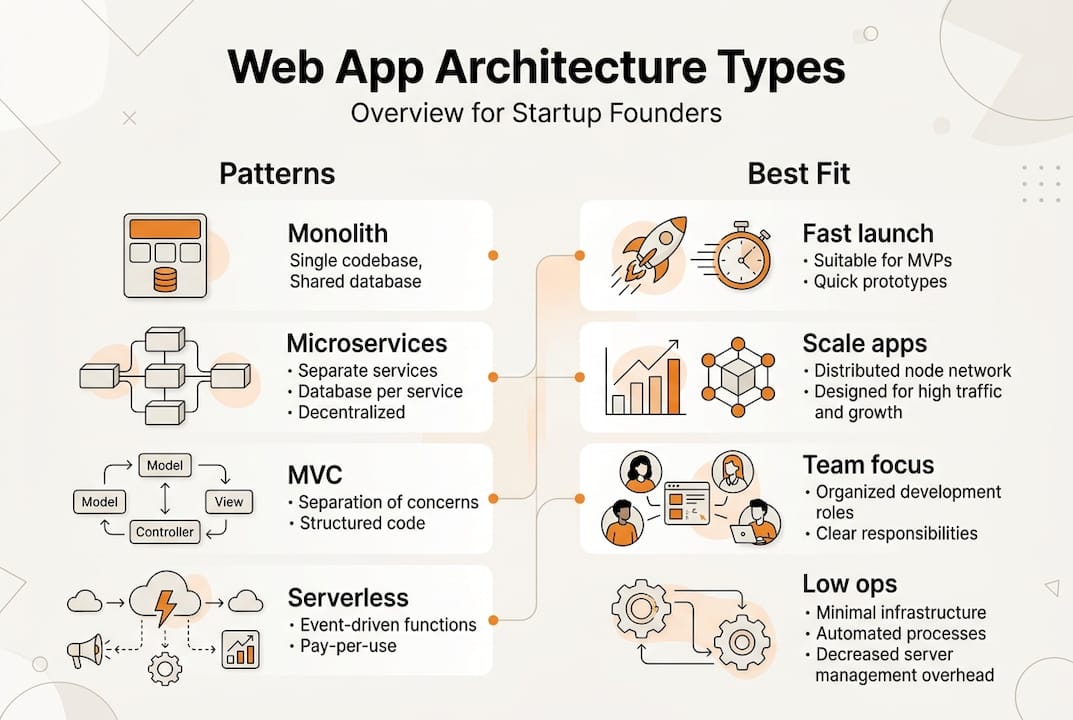
Monolithic architecture packages your entire application as a single deployable unit. All features share the same codebase, database, and runtime environment. Monolith suits small teams with simpler ops and faster development. You avoid network calls between services, simplify debugging, and deploy changes quickly. The downside appears when scaling specific features independently becomes impossible.
Microservices architecture splits functionality into independent services communicating through APIs. Each service owns its data, deploys separately, and scales based on demand. Microservices suit large teams with independent scaling but add complexity. You gain flexibility but inherit challenges with distributed transactions, service discovery, and monitoring.
Model-View-Controller (MVC) separates concerns into three components. Models manage data and business logic. Views render user interfaces. Controllers handle user input and coordinate between models and views. This pattern works within both monoliths and microservices, providing clear code organization.
Pattern | Best for | Key advantage | Main drawback |
|---|---|---|---|
Monolithic | Teams under 20 developers | Fast development cycles | Difficult to scale specific features |
Microservices | Teams over 50 developers | Independent service scaling | Operational complexity increases |
Serverless | Variable traffic patterns | Pay only for actual usage | Cold start latency issues |
SPA | Highly interactive apps | Smooth user experience | SEO challenges without SSR |
SSR | Content-heavy sites | Better initial load performance | Server resource requirements |
Serverless architecture runs code in response to events without managing servers. Cloud providers handle scaling, patching, and infrastructure. You pay only for execution time, making it cost-effective for variable workloads. Cold starts can introduce latency for infrequent functions.
Single Page Applications (SPAs) load once and update content dynamically without full page refreshes. Multi-Page Applications (MPAs) render new pages on the server for each navigation. SPAs excel at interactivity but require careful optimization to avoid large JavaScript bundles. Understanding web app design workflow helps you balance these approaches.
Server-Side Rendering (SSR) generates HTML on the server before sending it to browsers. This improves initial page load times and SEO compared to client-only rendering. Modern frameworks support hybrid approaches combining SSR with client-side hydration.
Pro Tip: Most startups should begin with a modular monolith that organizes code into clear boundaries. This provides monolith simplicity with a path to extract microservices later when specific modules need independent scaling. Avoid premature microservices adoption that burdens small teams with unnecessary complexity. Review mobile app UI trends to align architecture choices with user expectations.
Performance considerations and pitfalls in web app architecture
Fine-grained reactivity frameworks like Solid.js excel in updates; SSR reduces Largest Contentful Paint; WebFlux better for network-bound vs MVC for compute-bound. Framework selection directly impacts how quickly your application responds to user interactions and renders content. Choosing the wrong framework creates performance debt that compounds as your user base grows.
Server-Side Rendering dramatically improves perceived performance by sending fully rendered HTML to browsers. Users see content faster compared to waiting for JavaScript to download, parse, and execute. This matters especially on mobile devices with slower processors and network connections. SSR reduces Largest Contentful Paint (LCP), a critical Core Web Vital measuring how quickly main content appears.
Network latency degrades performance significantly at scale. Each additional API call adds round-trip time between client and server. Chatty interfaces making dozens of requests create sluggish experiences. SPA bundle bloat is common when developers add features without code splitting. Distributed transactions need sagas or two-phase commit patterns to maintain consistency across services.
Common performance pitfalls include:
Loading entire JavaScript bundles upfront instead of lazy loading features
Making synchronous API calls that block user interactions
Skipping image optimization leading to massive file transfers
Ignoring database query optimization until production slowdowns occur
Failing to implement proper caching at multiple layers
No single right way exists for all applications. Use SPA for interactive apps, SSR for SEO and performance; measure CWV, INP, LCP to guide decisions. Core Web Vitals provide objective metrics showing how real users experience your application. Largest Contentful Paint measures loading performance. Interaction to Next Paint (INP) tracks responsiveness. Cumulative Layout Shift quantifies visual stability.
Pro Tip: Set performance budgets before building features. Define maximum bundle sizes, API response times, and acceptable LCP thresholds. Monitor these metrics in production using Real User Monitoring (RUM) tools. Performance regressions caught early cost far less to fix than those discovered after launch. Explore UI design for startups principles that enhance perceived performance through smart loading states.
"Architecture decisions made in the first month of development often determine performance characteristics for years. Changing rendering strategies or database technologies after launch requires massive refactoring. Measure early, optimize continuously, and design for the performance your users expect."
Balancing interactivity with SEO requires thoughtful tradeoffs. Pure SPAs deliver smooth interactions but struggle with search engine crawling and social media previews. Pure SSR provides excellent SEO but sacrifices some interactivity. Hybrid approaches using SSR for initial load and client-side navigation for subsequent interactions offer the best of both worlds. Consider accessibility in app development when optimizing performance to ensure fast experiences benefit all users.
Practical approach for startups: modular monolith and evolutionary architecture
Modular monolith first, then extract services using strangler pattern; constraint-driven by data volatility, team size; hybrid rendering (SSR + hydration) recommended. This evolutionary approach lets you move fast early while preserving flexibility to scale later. You avoid both premature optimization and architectural dead ends.
Start with a modular monolith that organizes code into distinct modules with clear boundaries. Each module handles a specific domain like user management, billing, or content delivery. Modules communicate through well-defined interfaces rather than direct database access. This structure provides monolith simplicity while enabling future service extraction.
The strangler pattern gradually replaces monolith functionality with microservices. You identify a module ready for independent scaling, build it as a separate service, route traffic to the new service, and eventually remove the old module. This incremental approach reduces risk compared to big-bang rewrites. Understanding web app design workflow helps you plan these transitions.
Constraint-driven decisions focus architectural changes on actual bottlenecks rather than hypothetical scaling needs. Extract services when:
A module requires different scaling characteristics than the rest of the application
Team size exceeds 20 developers causing coordination overhead in the monolith
Data volatility demands independent deployment cycles for specific features
Performance profiling identifies clear boundaries where service extraction improves metrics
Regulatory or security requirements mandate isolated data handling
Stage | Team size | Architecture | Deployment | Monitoring focus |
|---|---|---|---|---|
Launch | 2-5 developers | Modular monolith | Single deployment | User metrics, errors |
Growth | 6-20 developers | Monolith with modules | Single with feature flags | Performance, scaling |
Scale | 21-50 developers | Hybrid with 2-3 services | Multiple pipelines | Service health, dependencies |
Enterprise | 50+ developers | Microservices | Independent per service | Distributed tracing, SLOs |
Hybrid rendering combines Server-Side Rendering for initial page loads with client-side hydration for subsequent interactions. The server sends fully rendered HTML improving time to first paint. JavaScript then takes over, enabling smooth navigation without full page reloads. This approach delivers excellent SEO and performance while maintaining SPA-like user experiences.
Pro Tip: Measure before extracting services. Use application performance monitoring to identify actual bottlenecks rather than guessing which modules need independent scaling. Many startups waste months building microservices infrastructure when simple database optimization or caching would solve their performance issues. Focus on user-facing metrics that directly impact business outcomes. Leverage mobile backend overview insights when planning backend service extraction.
Evolutionary architecture acknowledges that perfect decisions upfront are impossible. Design for change by keeping modules loosely coupled, maintaining comprehensive test coverage, and documenting architectural decisions. Your architecture should evolve as you learn more about user behavior, scaling challenges, and team dynamics. The goal is not finding the perfect architecture but building systems that adapt as your startup grows.
Get expert app development support for your startup
Choosing the right web app architecture sets the foundation for your product's success. But translating architectural decisions into production-ready code requires experienced development teams who understand both technical excellence and startup constraints.

TouchZen Media specializes in building scalable mobile and web applications for startups navigating these exact challenges. Our Orange County app development agency combines strategic consulting with hands-on development to deliver solutions that grow with your business. We help founders make informed architecture decisions, implement performance optimizations, and build user experiences that drive engagement. Our top UX designers USA team ensures your architecture choices translate into interfaces users love. Whether you need iOS development, Android apps, or full-stack web solutions, our top mobile app development companies ranking reflects our commitment to quality and results. Contact us to accelerate your app launch while avoiding common architectural pitfalls.
Frequently asked questions
What is web app architecture?
Web app architecture defines how frontend, backend, and database components interact to deliver user experiences. It determines data flow, scaling capabilities, and maintenance complexity. Good architecture enables fast feature development while supporting growth.
Should startups choose monolith or microservices architecture?
Start with a modular monolith if your team has fewer than 20 developers. This provides development speed and operational simplicity while organizing code for future service extraction. Move to microservices only when specific modules need independent scaling or team coordination becomes difficult.
How does architecture choice affect app performance?
Architecture determines rendering methods, API call patterns, and caching strategies that directly impact load times and responsiveness. Server-Side Rendering reduces initial page load. Proper service boundaries minimize network latency. Framework selection affects update speed and bundle size.
What are Core Web Vitals and why do they matter?
Core Web Vitals measure real user experience through Largest Contentful Paint (loading), Interaction to Next Paint (responsiveness), and Cumulative Layout Shift (visual stability). These metrics correlate with user engagement and search rankings. Monitor them to guide architecture and optimization decisions.
When should I extract microservices from a monolith?
Extract services when performance profiling identifies clear bottlenecks, team size exceeds 20 developers causing coordination issues, or specific modules require independent scaling. Use the strangler pattern to gradually replace functionality rather than attempting risky big-bang rewrites. Measure before extracting to ensure you solve actual problems.
What is the difference between SPA and SSR?
Single Page Applications load once and update content dynamically using JavaScript, providing smooth interactions but potentially slower initial loads. Server-Side Rendering generates HTML on the server before sending to browsers, improving initial performance and SEO. Hybrid approaches combine both techniques for optimal results.